Instagram transcript · troubleshooting
Why an Instagram Reel Transcript Can Fail on a Public Link
A Reel can look public and still be unreachable to a transcript service. “Public” in the app is not the same as anonymously accessible from outside it. First test the link in a private browser window while signed out; then use the exact error or result to choose the next step. A browser check is a useful screen, not a guarantee that every service will accept the video.
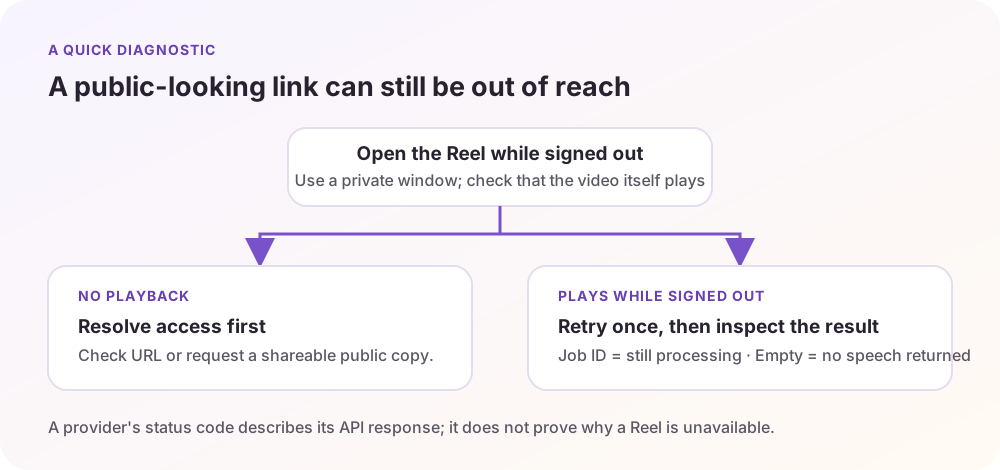
Start with the access check
- Copy the Reel’s full URL from Instagram and open it in a private or incognito window where you are not signed in.
- Check whether the video itself plays. A profile page loading is not enough: the Reel may still ask the viewer to sign in or show an access restriction.
- If playback is blocked, resolve access first. Recheck the URL for a typo, and ask the owner for a version they have made publicly viewable. Do not try to bypass a private account or login gate.
- If playback works, try the transcript request once more. If it still fails, keep the service’s error message; “public” alone does not identify the cause.
Supadata’s transcript documentation says its endpoint handles public Instagram video URLs, but only videos it can access without authentication. It lists login-required, subscriber-only, private, age-restricted, and heavily geoblocked videos as restricted cases. The same documentation recommends checking access in a signed-out private window. These are that provider’s documented rules; another tool may behave differently. Supadata: Video Accessibility.
Read the result as a clue, not a diagnosis of the Reel
- 404 Not Found: Supadata documents this for a video that does not exist or is private. Recheck the URL, then confirm that the Reel opens while signed out. A 404 does not prove which of those two conditions applies.
- 403 Forbidden: its docs associate this with authentication or another restriction. Check whether Instagram asks for login, age verification, or a region-specific view. Do not infer that the creator deleted the Reel from this code alone.
- 202 Accepted with a job ID: processing has started asynchronously; it is not a completed transcript yet. The client needs to check the job result. If a site only shows a spinner, the interface may not be displaying that later result clearly.
- 200 with empty content: the docs describe this as a successful transcription response with no speech detected. That can mean there were no spoken words for the service to return; it does not mean the Reel has no visual text, music, or other sound.
Important limit: these status-code meanings are documented for Supadata’s API. If a website hides the provider’s response, you may not be able to see the status code at all. Treat a generic “failed” message as unknown until the service gives more detail.
Two cases a public link cannot fix
An ongoing Live: Supadata says it transcribes complete media and does not support live streams or similar content while they are still in progress. Wait for a complete recording to become available, if the owner chooses to publish one, and try that recording’s link.
A video that plays only in your signed-in session: a link can appear ordinary when you are logged into Instagram while remaining inaccessible to an outside service. If it fails the signed-out playback check, there is no reliable URL-only troubleshooting step that turns restricted access into public access.
Provider limitations: Live Streams and Video Accessibility. Documentation checked on 2026-09-27.
Use this short decision path
Plays while signed out → retry once; if it still fails, save the exact tool error and contact that provider. Does not play while signed out → the issue is access, not a missing transcript button; use only a public version or ask the owner for permission and a shareable copy. Live or still processing → wait for complete media or for the job result. Completed but empty → the transcript service detected no speech to return; if the words are on-screen, use an OCR workflow separately.
This order prevents a common dead end: changing browsers or repeatedly pasting the same URL when the underlying video is not anonymously playable. It also keeps three different outcomes separate: blocked retrieval, delayed processing, and a completed result with no detected speech.